
restAD - a read-only REST API for Microsoft Active Directory
2026-10-24
restAD
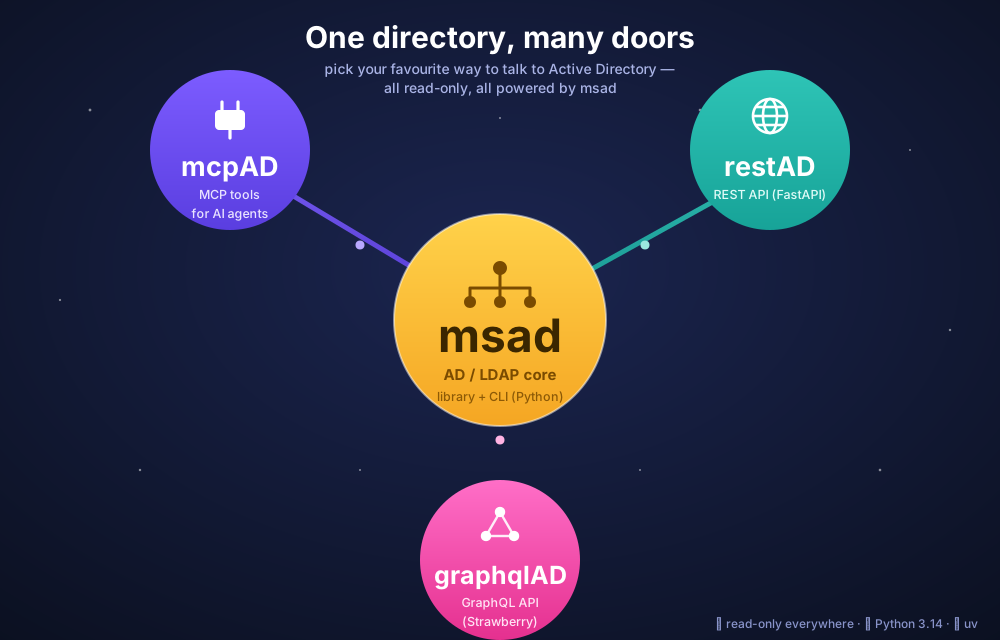
restAD is a read-only REST interface over the msad Active Directory / LDAP library, built with FastAPI + Pydantic, managed with uv on Python 3.14.
Only LDAP search operations are exposed. No write operation (create / modify / delete / password reset / group membership changes) is reachable through the API — the schema only ever contains GET endpoints.
If you already know msad — the command line tool for working with AD/LDAP — restAD is its natural HTTP counterpart: the same typed library, now reachable as a plain JSON API for scripts, dashboards or any tool that can make an HTTP request.
Endpoints
Every endpoint maps almost 1:1 to an msad function, grouped by object type.
| Area | Endpoints |
|---|---|
| Health | GET /health — connectivity probe (connect/bind test) |
| Users | GET /users (by field), /users/inactive, /users/never-expiring, /users/expired, /users/risks/password-not-required, /users/risks/kerberos-preauth-not-required, /users/risks/not-delegated, /users/{id}, /users/{id}/groups, /users/{id}/status, /users/{id}/disabled, /users/{id}/locked |
| Computers | GET /computers (by field, optionally exclude_domain_controllers=true), /computers/stale, /computers/domain-controllers, /computers/os-summary, /computers/{id} |
| Groups | GET /groups (search), /groups/empty, /groups/security (optionally `scope=global |
| Contacts | GET /contacts (search by cn/mail/displayName) |
| OUs | GET /ous (find), /ous/contents?ou_dn=..., /ous/{id} |
| Audit | GET /audit/domain, /audit/password-policy, /audit/password-policy/violations, /audit/privileged-groups, /audit/fsmo-roles, /audit/trusts, /audit/sites, /audit/gpos, /audit/gpos/{id}, /audit/fine-grained-password-policies |
LDAP entries are dynamic — their attributes depend on what the directory actually returns — so every endpoint serializes them as open JSON objects inside small, typed envelopes (count + entries, or entry).
Authentication and configuration
The effective connection configuration is resolved in two layers, with the environment always winning over the file:
- msad TOML file (optional) —
~/.msad.tomlby default, or the path inMSAD_CONFIG_FILE.MSAD_DOMAINselects which[domains.<name>]section to use. MSAD_*environment overrides —MSAD_HOST,MSAD_BASE,MSAD_PORT,MSAD_USE_SSL,MSAD_USER,MSAD_PASSWORD,MSAD_QUERY_TIMEOUT.
This lets non-secret settings live in the TOML file (or be omitted entirely) while credentials are injected at runtime through the environment, so secrets never need to live on disk.
Authentication mode is chosen automatically:
- Omit
MSAD_USER/MSAD_PASSWORD(and leave them unset in the TOML) → Kerberos/SASL bind — runkinitfirst. - Set both → simple user/password bind.
Server behavior is controlled by RESTAD_HOST, RESTAD_PORT, RESTAD_LAZY_CONNECT (start even if the directory is unreachable at boot) and RESTAD_DOCS (toggle /docs, /redoc, /openapi.json).
Running
export MSAD_HOST=dc.example.com
export MSAD_BASE='dc=example,dc=com'
export MSAD_PORT=636
export MSAD_USE_SSL=true
export MSAD_USER='svc_reader'
export MSAD_PASSWORD='s3cr3t'

uv run restad
# or: uv run uvicorn restad.app:app --host 0.0.0.0 --port 8000
Then open the interactive docs at http://127.0.0.1:8000/docs.
Run with uvx
No clone or install needed — uvx runs restAD in a throwaway environment, configured entirely through the same MSAD_* / RESTAD_* variables:
MSAD_HOST=dc.example.com MSAD_BASE='dc=example,dc=com' \
MSAD_USER=svc_reader MSAD_PASSWORD='s3cr3t' \
  uvx restad
Kerberos (SASL/GSSAPI) authentication is optional: msad’s gssapi dependency is a native extension that needs the system Kerberos dev headers to build (e.g. libkrb5-dev on Debian/Ubuntu, krb5-devel on RHEL/Fedora, krb5 via Homebrew on macOS). If you only authenticate with user/password, skip it entirely; otherwise install the kerberos extra:
uvx --from 'restad[kerberos]' restad
Why it is useful
restAD turns msad into a plain HTTP/JSON API: any script, dashboard, low-code tool or service that can make a GET request can now ask “which computers haven’t checked in for 90 days?”, “who’s in Domain Admins?” or “list every group with no members” — without touching LDAP, and without any risk of writing to the directory, since the whole API is read-only by construction.
The code is available on GitHub and the package is published on PyPI.